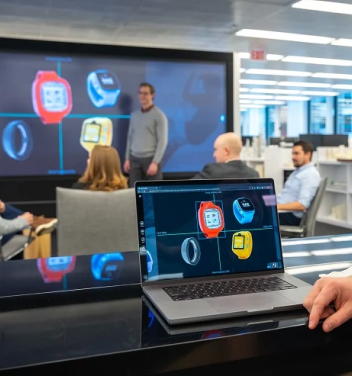
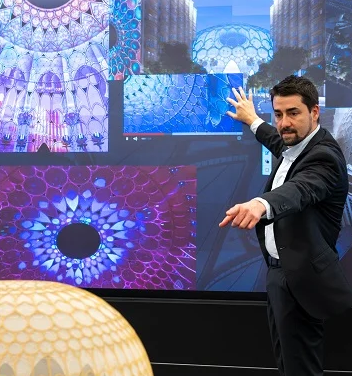
The world’s largest, seamless Visual Interactive Enhanced Workspace .
prysm view
prysm view pro
prysm view and view pro
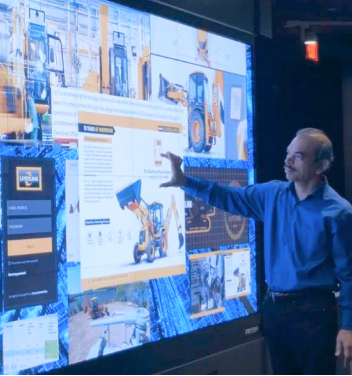
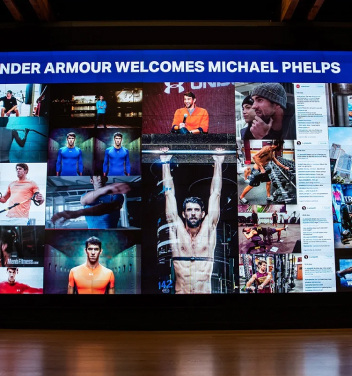
Prysm VIEW and VIEW Pro software with appliance empower a massive, multi-touch interactive workspace capable of scaling, sizing and annotating, both multi-stream high resolution content and BYOD sources.
Prysm VIEW provides an intuitive user interface for everyday uses such as video conferencing, interactive meetings or quick collaborations. Prysm VIEW supports third-party applications, including Teams and Zoom, as well as web-based apps such as MS Office.
Prysm VIEW Pro offers a full-featured application suite which supports cloud-based visual workspaces, ideal for customer experience centers and board rooms. Easily access meetings from any device, anywhere, and interact with content via multiple locations simultaneously. Workspaces are saved in the cloud, so you can add content and ideas to a workspace “project” before your customer or executive meeting.
prysm view
GRID-BASED CONTENT VIEWING
Prysm VIEW enables content visualization in multiple, preset, active grid layouts. Simultaneously view and size various content sources such as BYOD, browsers, video, spreadsheets, and dashboards.
SKETCHBOARD AND ANNOTATION
Launch an interactive brainstorming session with a single touch. Annotate with notes, drawings or highlights directly on-screen or via wireless keyboard. Share or print.
TEAMS-ZOOM-WEBEX CONFERENCING
Collaborate with your conferencing application of choice, Teams, Zoom or Webex. Prysm VIEW provides a single, integrated workspace where content can be viewed or shared along with meeting attendees.
REAL-TIME WEB-BASED APPLICATIONS
Prysm VIEW is capable to run web-based applications such as M365/OneDrive, Google Workspace, Salesforce and Miro. Access the applications that you use everyday to share and collaborate on the massive, touch-interactive Prysm LPD screen.
Visualize, share and annotate multi-source content on a massive touch screen and share via your preferred conferencing app or choice: Teams, Zoom or Webex.
use case
project meeting
Marketing Review – Website Update
Prysm VIEW enables project teams to collaborate better in a planned or ad-hoc manner.
Sketchboard
Sketch and discuss new visual concept for home page.
Browser
Open Figma wireframe in second grid for concept placement.
Teams
Connect with web dev firm; share new concept, wireframe.
BYOD
Cast tentative home page animation. Compare to new visual concept.
Excel
Open project schedule on OneDrive. Zoom, annotates, adjust.
Capture
Add dev firm completion date. Grab screen and send.
Prysm VIEW Pro enables content visualization in multiple active, free-form windows. Simultaneously view and size and share various content sources such as BYOD, browsers, video, spreadsheets, and dashboards.
SKETCHBOARD AND ANNOTATION
Launch an interactive brainstorming session with a single touch. Annotate with notes, drawings or highlights directly on-screen or via wireless keyboard. Share or print.
CLOUD-BASED VISUAL WORKSPACES
Collaborate in person or online via cloud-based visual workspaces. Users can join or lead meetings from any PC, tablet or smartphone in up to 15 locations simultaneously.
PROJECT-BASED CONtENT MANAGEMENT
Workspaces are saved and stored as projects in the cloud, so they are always synced and accessible. Add content and ideas to a project before a meeting starts to optimize collaboration.
Visualize, share and annotate multi-source content on a massive touch screen and share via your preferred conferencing app or choice: Teams, Zoom or Webex.
use case
product development
Product Review – Weekly meeting
Prysm VIEW Pro enables cross-functional teams to develop better through cloud-based visual workspaces.
Project
Open previous week’s product development workspace.
Connect
Connect development teams in multiple locations/ devices.
Share
Share workspace in real-time. Sketch. Share new videos/images.
Real-time App
Open 3D modeling software. Access latest design. Stretch, zoom, annotate.
Update
Modify 3D design real-time with simultaneous sharing.
Save
Write on-screen agreed design changes and next step. Save for next meeting.
Prysm Laser Phosphor Display (LPD) technology powers an advanced large format display that leverages precise laser activation of a phosphor emissive screen. LPD produces smooth, deep and incredibly natural imagery with exceptional visual clarity. Single panel construction enables a massive, touch-interactive workspace with near-perfect image uniformity.